Flux's AI agent is now up to 10x faster and self-corrects in real time, delivering cleaner schematics with less waiting and fewer wasted credits.

Despite newer technologies like USB and Ethernet, RS232 remains widely used due to its simplicity and broad compatibility. It's crucial in industries, scientific instruments, networking gear, and legacy computers. This protocol's reliability makes it the go-to for many applications. In this blog, we'll explore why RS232 continues to be relevant in our tech-savvy world.
Physical Characteristics of Connector Types (DB9, DB25)
The RS232 standard utilizes two primary types of connectors: DB9 and DB25.
Each connector type serves a specific application–modern, smaller applications or complex setups that need more control, respectively–with different pin configurations for transmitting data, receiving data, and various control signals.

Pinouts in RS232 connectors define the functionality of each pin. These configurations vary between DB9 and DB25 connectors. The standard pinouts include pins designated for Transmit Data (TXD), Receive Data (RXD), and several control signals like Request to Send (RTS) and Data Terminal Ready (DTR).
DB9 Pinout for RS232 Communication:
Despite the advent of more advanced communication protocols like USB and Ethernet, RS232 remains used due to its simplicity and wide compatibility. It's commonly used in industrial and scientific instruments, networking equipment, and legacy computer systems.
Common issues in RS232 communication include misconfigured baud rates, incorrect parity settings, and improper cable connections. Troubleshooting these problems requires a systematic approach, often involving checking cable connections, verifying device configurations, and using diagnostic tools like serial port monitors.

A voltage drop calculator is an essential tool for assessing the decrease in voltage across a conductor, ensuring electrical devices receive adequate power for optimal operation. Read our blog to learn more.
Voltage drop in electrical circuits can lead to various issues, affecting the performance and lifespan of electrical equipment:
Here's a table summarizing the NEC guidelines on voltage drop:
Voltage drop calculators typically require you to input the following parameters:
The calculator then computes the voltage drop based on the inputs and provides the result in volts or as a percentage of the initial voltage. Some calculators also provide the minimum conductor size required to limit the voltage drop to a specified level.
Voltage drop of the circuit conductors can be determined by multiplying the current of the circuit by the total resistance of the circuit conductors: The Ohm’s law (V = I*R) method only applies for DC current and cannot be used for three-phase circuits.
Transforming the formula, we have:
V = 2*R*I*L
Where:
Generally, with the cable information (length, size, material, operating temperature, and cover type), we can find its resistance and inductance from the reference tables. Three-phase AC power, with three sine waves offset by 120 degrees, is used in industrial and commercial settings for more efficient power distribution and to run heavy machinery.
V=3*I*L*(R*cosθ+X*sinθ)
For balanced three-phase circuits, a simplified calculation is:
V =3*I*Z*L/1000
Where:
The significance of calculating voltage drop extends beyond basic electrical design; it's a key factor in the overall performance and safety of electrical systems. Excessive voltage drop is a common culprit behind inefficient system performance, equipment malfunctions, and even safety hazards, which can lead to costly repairs and downtime. Furthermore, meeting the stipulations of electrical codes and standards, which dictate maximum allowable voltage drop levels, is non-negotiable for electrical professionals. Ensuring devices operate within these guidelines means that voltage drop calculations are not just a matter of efficiency but of compliance and safety as well.

This blog will explore functional block diagrams, their pivotal role in system design, the symbiotic relationship with ladder logic, structured text, and the broader realm of PLC programming. Why FBDs are so important within complex systems.
A functional block diagram is a schematic representation that delineates the principal functions of a system and the flow of data between them. It serves as a cornerstone in system engineering, simplifying the visualization of complex interactions within systems. FBDs are characterized by their use of labeled blocks connected by lines indicating dataflow, making them an intuitive means for depicting system operations.
The advantages of function block diagrams are that they’re very easy to follow and understand. They are generally laid out to mimic a specific process thus making it easy to understand for those who don’t have a background in plc programming.
In essence, an FBD breaks down large systems into manageable, functionally discrete blocks, facilitating a modular approach to system design. This modularity is crucial, allowing designers to focus on individual functions without being overwhelmed by the system's overall complexity.
The potency of a functional block diagram lies in its simplicity and clarity, achieved through three fundamental components:
FBDs do not exist in isolation; they are part of a larger ecosystem of programming languages and representation techniques used in the programming of programmable logic controllers (PLCs). Ladder logic, with its origins in electrical wiring diagrams, offers a graphical method that is intuitive for those with a background in electrical engineering. It depicts control logic in a format resembling a ladder, with rungs representing logical operations.
Structured text, another facet of PLC programming, is a high-level textual programming language that resembles traditional computer programming languages. It allows for complex instructions and algorithms to be implemented in a more familiar syntactic form.
FBDs complement these programming paradigms by providing a visual overview of system logic and dataflow, serving as a bridge between the conceptual design and the detailed implementation in ladder logic or structured text. This synergy enhances the understandability, development efficiency, and maintainability of PLC-based systems.
PLCs stand at the forefront of industrial automation, controlling machinery and processes with precision and reliability. In the domain of PLC programming, FBDs play a pivotal role, offering a graphical method for designing and implementing control logic.

FBDs align perfectly with the operational paradigm of PLCs, which are inherently designed to execute logic operations based on real-time data inputs. The visual nature of FBDs facilitates the rapid development and troubleshooting of PLC programs, enabling engineers to map out complex control strategies in a more intuitive and less error-prone manner.
Moreover, the adoption of FBDs in PLC programming underscores the importance of a clear and structured approach to system design. By visualizing the functional architecture of a system, engineers can ensure that all components interact harmoniously, leading to more robust and reliable PLC-based control systems.
As system complexity continues to escalate, the role of functional block diagrams in system design is not only preserved but also expanding. The integration of FBDs with advanced simulation tools and software development environments is enhancing their utility, allowing for more dynamic and interactive system modeling.
The future of FBDs is likely to witness further integration with artificial intelligence and machine learning technologies, enabling smarter and more adaptive systems. As these advanced systems become more prevalent, the clarity and efficiency offered by FBDs will become even more critical in navigating the complexity of modern system design.
Functional block diagrams are a testament to the power of visual representation in the realm of system design. By distilling complex system functionalities into comprehensible blocks and illustrating the dataflow dynamics, FBDs provide a foundation for designing, implementing, and maintaining sophisticated systems. Their symbiotic relationship with ladder logic, structured text, and PLC programming languages enhances their utility, making them an indispensable tool in the engineer's toolkit.
If you're a lover of smart home devices, you're likely buzzing with excitement over Arduino's recent collaboration with Silicon Labs. We are too, and we’re even more excited to bring the power of this collaboration to life on Flux. As of today, we’re excited to announce that engineers can fully design Arduino-based Matter boards with Flux.
The Matter protocol is growing to become a cornerstone of the Internet of Things (IoT) and smart home industries, offering a unified, secure, and reliable framework for connected devices. Developed by the Connectivity Standards Alliance (CSA), Matter was developed to simplify the complexity of IoT by ensuring that devices from various manufacturers can seamlessly communicate with each other.
At its core, Matter is an IP-based connectivity protocol that leverages common networking technologies such as Ethernet, Wi-Fi, and Thread to facilitate communication among smart devices. By adopting a universal approach, Matter enables devices to interact over existing networks, removing the need for proprietary bridges or gateways. This interoperability is achieved through a standardized application layer that operates on top of these networks, ensuring devices can understand each other regardless of the manufacturer. Even Zigbee devices can connect with Matter using a gateway device.
Prior to the introduction of Matter, the smartthings market was extremely fragmented, with myriad communication protocols leading to compatibility issues and a challenging user experience. Consumers would find themselves locked into a single ecosystem or struggle to integrate new devices into their existing setups. For example, a connected home might have to choose between Apple's ecosystem, with Siri, the Apple Homekit and the Homepod Mini, or Google's ecosystem, with Google Assistant, Google Home, and Google Nest. A smart plug that might support Amazon Alexa-enabled smart speakers might not support smart lighting from Nanoleaf.
Matter addresses these pain points by providing a common language for smart home devices, fostering an environment where products from different ecosystems can coexist and operate in harmony.
The news that has us so excited is Silicon Labs and Arduino’s recent partnership aimed at democratizing the IoT through the Matter protocol.
The partnership focuses on integrating Silicon Labs' advanced hardware with Arduino's extensive libraries and development environment to support Matter. On Arduino’s side, their team created a custom library and Arduino core for Matter-supported Silicon Labs microcontrollers. The major hardware involved in this partnership are Silicon Labs’ MG24 Series Wireless SoCs and the MGM240 Wireless Modules, as well as supported development boards including the xG24 Explorer Kit and the SparkFun Thing Plus Matter MGM240P.
Even more exciting is that, in the near future, the two companies will be releasing a brand new Arduino Nano board based around the MGM240 module.
Ultimately, the partnership is so important because it underscores the growing importance of Matter in the IoT and smartthings ecosystems. By combining Silicon Labs' cutting-edge wireless solutions with Arduino's accessible development tools, this alliance aims to empower developers, from hobbyists to professionals, to create innovative, Matter-compliant smart home products with ease.
Like the CSA, Flux is fully invested in democratizing technology. So now it’s Flux’s turn to contribute to the IoT community.
We’re excited to be supporting Arduino and Silicon Labs’ partnership by introducing a new Matter-compatible hardware lineup to the Flux community.
With available devices including the MG24 SoC, the MGM240 module, and development boards such as the xG24-EK2703A Developer Kit and the SparkFun Thing Plus Matter, Flux is your home for all things IoT. Not to mention our already-existing support for dozens of other components and modules from Arduino, Raspberry Pi, Seeed Studio, and more.
But sometimes, just having access to the parts is not enough. Ever stared at your Arduino, teeming with ideas but wondering, "Where do I even start?" We've all been there. But with Flux, those days are history.
Flux offers the perfect solution to significantly lowering the learning curve for hardware design. By providing reference designs and modules, and allowing users to fork and customize existing projects, Flux empowers designers to bring their unique IoT devices to life without ever having to start from scratch. Just Fork a project, tweak it, and boom—you're not just making a device, you're crafting the future.
So whether you’re a hobbyist developing a prototype for your smart home or you’re a seasoned professional building the next generation of home automation, anything is possible with Flux.
So, what are you waiting for? Dive into the exciting world of Arduino-based Matter projects with Flux. Bend the rules, break the mold, and bring your unique visions to life. We can't wait to see the magic you'll create with these new tools. Welcome to the future of IoT design, where your imagination is the only limit. Let's make something amazing together with Flux.
To learn more about Flux and the new Matter hardware, contact sales today!
This blog post explores the fundamental role of diodes in electronics, focusing on understanding their symbols and various types like Zener, Schottky, and LEDs. It details the electrical signal of diodes, illustrating how they allow current flow in one direction.
A diode, fundamentally a PN junction, permits current to flow primarily in one direction. It consists of two different doped semiconductor regions -- an N doped and a P dope region -- joined together, forming a PN junction.
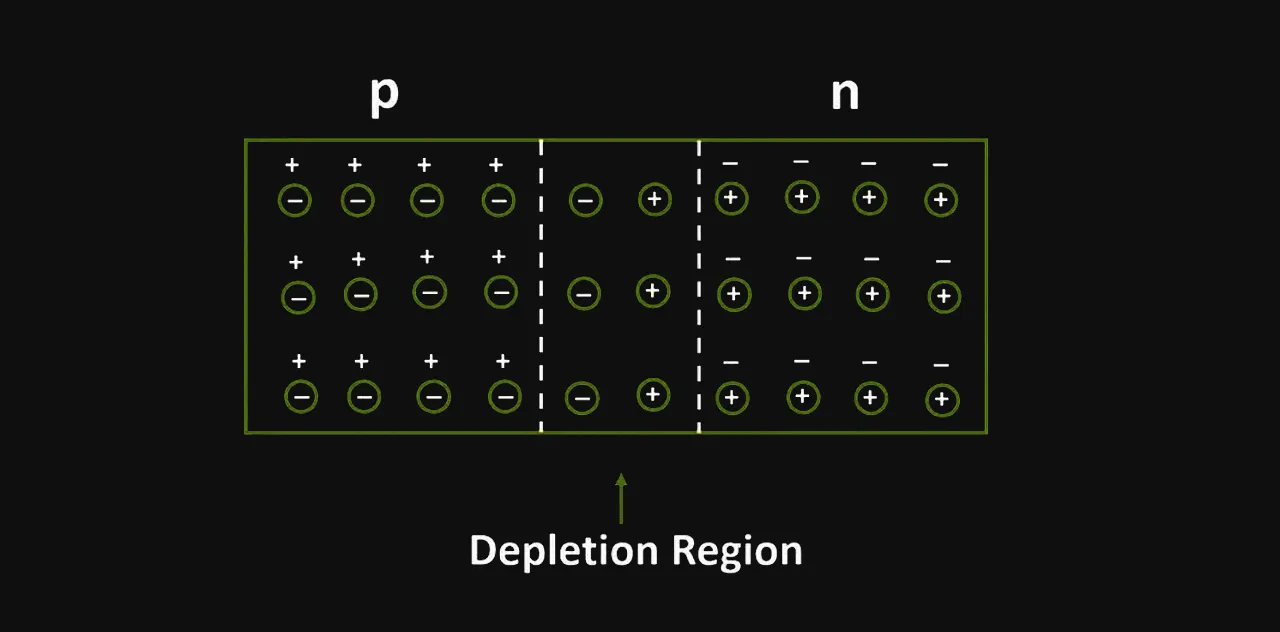
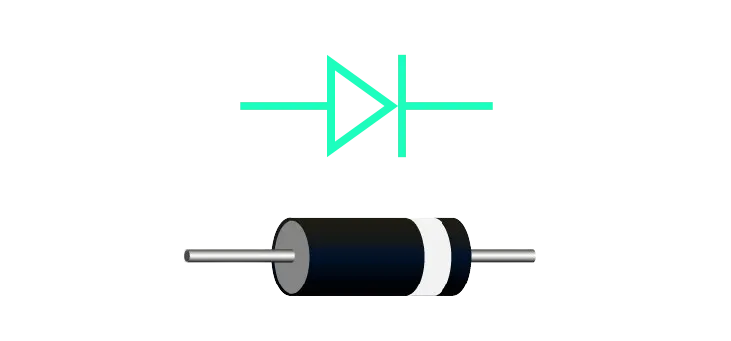
Its electrical signal is characterized by allowing easy current flow in the forward direction, while significantly impeding it in the reverse. This unique property is visually represented by an arrow, pointing in the allowed direction of current flow, and a line indicating the barrier for reverse flow.
Identifying a diode in a circuit involves looking for a component with two terminals: the anode and the cathode. The anode is marked by the arrowhead in the diode symbol, pointing towards the cathode, marked by the vertical line. Physical diodes often have a band on the cathode side. In schematics, diodes are also marked with designators like ‘D’ followed by a number (e.g., D1, D2).
Diodes serve myriad purposes in electronics. Their primary function is to enable unidirectional current flow, making them crucial for tasks like rectification – converting alternating current (AC) to direct current (DC). Specific diode types, such as the Zener diode, offer voltage regulation by maintaining a constant voltage over a range of currents. Varactor diodes (varicaps) change capacitance based on the applied voltage, useful in tuning circuits. Meanwhile, Schottky diodes, known for their low forward voltage drop, excel in fast-switching applications.
The function of a diode is primarily to control the direction of current flow in a circuit. Besides this, diodes have specialized functions based on their type:
A rectifier's core purpose is to convert AC to DC. In electronic circuits, this is crucial for powering devices that require stable DC voltage. Rectifier diodes are specifically designed for this task, efficiently handling high currents and voltages. Rectifiers are essential in power supplies, battery charging systems, and are integral to the functioning of electronic devices ranging from smartphones to industrial machinery.
In an automotive alternator, the rectifier converts the AC generated by the alternator into DC to charge the battery and power the electrical system. It typically employs a set of diodes arranged in a bridge configuration. The alternator generates three-phase AC, which the diode bridge rectifies into a smoother DC output. This process is vital for maintaining the battery’s charge and ensuring a consistent power supply to the vehicle's electrical systems.
Understanding diode symbols and their functions is a critical aspect of electronics. From simple rectification tasks to complex frequency tuning, diodes play pivotal roles in various applications. Recognizing these symbols not only aids in circuit analysis but also enriches the understanding of how electronic components interact to perform diverse and sophisticated functions. Whether it's a Zener diode stabilizing voltage or a laser diode in an optical communication system, each diode type brings unique capabilities to the vast and intricate world of electronics.
Designing a PCB is an intricate and engaging process that plays a pivotal role in electronics. The steps and tips provided in this article are not exhaustive but will certainly help you in your journey to designing effective and efficient PCBs. Armed with these insights, it's time to bring your electronic ideas to life with your own PCB designs
A PCB, or Printed Circuit Board, is a mechanically designed structure that electrically connects and mechanically supports electronic components using conductive tracks, pads, and other features etched from copper layers laminated onto a non-conductive substrate.
PCBs play a pivotal role in the functionality of virtually all electronic devices. They provide a physical platform for mounting components and establish the necessary electrical interconnections, thus forming a system's electronic circuitry.
The purpose of this article is to demystify the process of PCB design, taking you through the essential steps from conception to completion, along with offering practical tips for success.
The basis of any printed circuit board design lies in the electronic circuit you aim to build. Thus, a firm grasp of circuit design principles, such as understanding how different components interact and basic electronic principles, is vital.
Before starting the design, it is crucial to define the design parameters. These could include the board's size and shape, the number of layers, the types of components used (through-hole or surface mount), the operating environment, power requirements, and more.
Based on the design parameters and functional requirements, the right components and board material (such as dielectric) must be selected. Components should be chosen based on electrical requirements, availability, cost, and space considerations, while board material should provide appropriate thermal and mechanical stability.
The first step in PCB design is creating a schematic diagram that represents the electrical connections between different components. It serves as a blueprint for the PCB layout.
Each component symbol is placed on the schematic, and interconnections are drawn using lines to represent electrical connections or nets. Different components like resistors, capacitors, transistors, inductors, and integrated circuits, will each have their own unique component symbol.
The completed schematic diagram is used to generate a netlist, which is a comprehensive report detailing every electrical connection in the design.
Before progressing, the schematic should be thoroughly checked for errors to prevent problems in later stages.
Once the schematic is verified, the netlist is imported into a PCB layout tool to start designing the physical layout of the circuit board.
The PCB's dimensions and layers are defined, and design rules (spacing, width, etc.) are set based on manufacturing capabilities and requirements. This includes the selection of dielectric and stack up.

The completed schematic diagram is used to generate a netlist, which is a comprehensive report detailing every electrical connection in the design.
Before progressing, the schematic should be thoroughly checked for errors to prevent problems in later stages.

Components like capacitors, resistors, inductors, transistors, and integrated circuits are strategically placed on the circuit board to optimize space, minimize trace lengths, and avoid interference.
Traces, which are the copper paths connecting components, are routed based on the netlist. Their width is set to accommodate the current they will carry.
Unused areas on the PCB can be filled with copper pour to improve electromagnetic compatibility. Design rules checks (DRC) are run to ensure the design meets manufacturing tolerances.
Once the layout is finalized, Gerber files, which are the manufacturing blueprints for the PCB, are generated along with other manufacturing specifications.
The design is thoroughly reviewed one final time, and all necessary documentation for manufacturing is prepared.
The Gerber files and other documentation are sent to the manufacturer, and after their review and possible corrections, the PCB is manufactured. The manufacturer may also assemble the board for you, where they solder the electronic components.
Keep designs as simple as possible. Complexity increases the chances of error and can lead to difficulties in troubleshooting and manufacturing.
Constantly keep the design parameters in mind during the design process. Parameters such as operating frequency, power requirements, and environmental conditions can significantly affect the design.
Always be aware of the orientation of components, especially polarized components like diodes and capacitors, to avoid assembly errors. Appropriate designators on the silkscreen can help here. This can also help the assembly house when they solder the electronic components to the board.
Maintain clear and open communication with your PCB manufacturer. They can provide valuable feedback about design for manufacturability (DFM) and help avoid costly errors.
Designing a PCB is an intricate and engaging process that plays a pivotal role in electronics. The steps and tips provided in this article are not exhaustive but will certainly help you in your journey to designing effective and efficient PCBs. Armed with these insights, it's time to bring your electronic ideas to life with your own PCB designs!