
Flux's AI agent is now up to 10x faster and self-corrects in real time, delivering cleaner schematics with less waiting and fewer wasted credits.
Flux Copilot helps your team tackle the complexities of PCB cost optimization, identifying hidden savings and providing engineers with actionable insights to streamline design processes and reduce costs.
The process of cost optimization in PCB design is notoriously multifaceted and time-consuming. Typically, it involves reviewing hundreds of components for cost and necessity and considering multiple optimization options for each. Each alternative option then needs to be evaluated against a sea of competitive products for technical viability and sourceability.
Needless to say, this process is time-consuming, and the chances of missing potential optimizations are extremely high. Realizing design optimizations without sacrificing functionality and reliability can be overwhelming.
Fortunately, we’ve developed Flux Copilot to be an ideal partner in your cost optimization efforts. By automatically evaluating a vast array of potential optimizations across numerous components simultaneously, Copilot can streamline your cost optimization process with unmatched efficiency. With Copilot at their side, engineers can identify more potential cost-saving measures in less time, even ones that might have been overlooked in a manual review.
Copilot then presents engineers with a comprehensive technical validation for each optimization suggestion. Armed with this data, engineers can make informed choices that balance cost savings with performance and reliability. This synergy between AI and human expertise empowers teams to tackle the cost optimization process more effectively, ensuring that no potential savings are left unexplored.
Here are some real-world examples that Flux users are already benefiting from:
BoM consolidation involves identifying outlier components that can be merged with existing values, reducing the number of unique components needed. For example, a circuit may require a unique resistance value, such as 31.23kΩ, but such a unique value is costly to source. Instead, Copilot can suggest implementing this resistance with two more standard and affordable solutions, such as a 30kΩ and 200Ω in series.

Stackup optimization analyzes project requirements such as temperature, humidity, and industry standards to determine the most cost-effective stackup material. For example, dielectric materials like FR-4 effectively balance performance and cost for consumer electronics applications. Copilot can analyze your project requirements and use them to optimize your stackup for cost efficiency accordingly.

Evaluating components for over-specification ensures that no component exceeds the necessary performance requirements, which can reduce costs. For example, assessing whether a high-performance microcontroller is necessary or if a lower-cost alternative can meet the project’s needs without compromising performance. Copilot can investigate the components in your schematic against the operating conditions of your circuit — be it power, temperature, or frequency — to ensure that no component is unnecessarily over-specified.

Identifying components in leadless packages and suggesting alternatives with leads, such as SOIC or TSSOP, can reduce manufacturing costs and improve assembly ease. This approach simplifies the assembly process and cuts down on production expenses. With Copilot, engineers can determine which components are viable for a simplified package, therefore cutting costs.

Standardizing connectors across the design enables bulk ordering, reduces costs, and simplifies inventory management. Identifying similar connectors and standardizing them helps streamline procurement and inventory processes. Copilot can interpret your design and offer suggestions for a single connector type that meets the needs of all of your board’s interfaces.
Organizing your BoM into groupings of functional blocks can allow your team to more easily compare designs across your product line. This kind of organization enables your team to identify inconsistencies across product BoMs, and then optimize your designs for better standardization and cost savings across the product portfolio. This standardization simplifies the design process and reduces component diversity, ultimately making sourcing easier and more affordable. Copilot can intelligently group your BoM into functional blocks to provide your team with better insight into standardization across your product line.
Cost savings can be achieved by replacing discrete components with integrated modules that combine multiple functionalities, such as Wi-Fi and Bluetooth, in a single module. Copilot can help you evaluate the cost-effectiveness of your current design and suggest integrated alternatives that help optimize your design.

Whether you’re an Electrical Engineer, a Product Manager, or a leader of technical teams, you and your organization will benefit from improving your cost-optimization process. More affordable designs means more affordable products for consumers, less risk for the enterprise, and increased competitive advantage for your brand. By leveraging AI-driven insights, teams can realize all of these benefits in one fell swoop.
Want to learn more about how your team can start using AI to streamline the cost optimization process? Sign up for Flux today.
Integrating AI into hardware development just became easier. Improve your research and planning phase with Flux Copilot—no need to change your existing tools.
The research and planning phase, which can account for up to 90% of project costs, is the perfect stage to introduce AI without major disruptions. By leveraging AI’s ability to digest vast amounts of information and ensure thorough coverage, your team can streamline processes, reduce costs, and lay a robust foundation for successful project outcomes.
Find out how Flux Copilot can optimize this critical phase and improve your hardware development process
The research and planning phase in large-scale hardware projects is crucial for setting a solid foundation for development. This phase involves defining key features, setting technical and business requirements, and aligning all stakeholders on project goals. Engineers and project managers sift through extensive documentation, coordinate with suppliers, and ensure components meet project criteria, making this phase time-consuming and complex.
Hidden costs in this phase are significant. Delays can lead to project overruns, increased costs, and missed market opportunities. Misalignments and last-minute changes often disrupt schedules and escalate costs. Errors made during this phase can result in costly redesigns, delays, and potential product failures.

AI, particularly large language models (LLMs), excels at handling knowledge work efficiently. In the research and planning phase, AI's ability to distill and organize information is invaluable. LLMs can digest, interpret, and synthesize vast amounts of data, helping your team find the best approach for your projects.
Flux Copilot, an advanced multi-modal LLM, integrates seamlessly into your existing hardware design workflows. Regardless of the EDA tools your company uses, Copilot centralizes all relevant data into a comprehensive knowledge graph, including datasheets, requirements documents, and your organization's best practices.
Understanding your project's context—such as the Bill of Materials (BOM), netlist connections, and specific requirements—Copilot automates routine tasks. It can read and interpret datasheets, suggest components, and generate initial architectural designs, allowing engineers to focus on strategic and creative work.
With Flux Copilot, you can efficiently capture and utilize requirements throughout the design process.
You can start by directly telling Copilot your project requirements, which can be captured as properties. These properties provide Copilot with the necessary context to assist you effectively, covering technical specifications, design constraints, performance metrics, and other essential parameters.
Additionally, you can feed Copilot your product meeting notes and other information sources. Copilot will analyze this information to create a complete set of requirements, ensuring that nothing is missed and all stakeholders are aligned. By centralizing requirements, Copilot helps prevent miscommunication and ensures smooth collaboration.
Traditional architectural design processes rely on familiar templates and past experiences, which can lead to missed opportunities for optimization. Copilot changes this narrative by empowering teams to explore a broader range of architectural variations.
By leveraging AI to generate and evaluate different design options automatically, Copilot enables teams to iterate and assess multiple designs in minutes. Then, with a breadth of options to choose between, Copilot helps teams identify the most optimal architecture for their project, leading to improved performance, reduced costs, and faster development times. AI-driven architectural design ensures that all potential configurations are considered, leading to better-informed decisions.
Read our blog to learn more about how Copilot assists in the architectural design process.

AI can revolutionize the architecture design review process by automating the tedious and time-consuming aspects of reviewing architectural plans against system descriptions. Copilot can be seamlessly integrated into your project, providing comprehensive insights into your architectural designs, including material specifications and structural interconnections. By aligning Copilot with your design goals and organizational best practices it ensures compliance with industry standards and your organization’s design constraints.
For example, Copilot can scrutinize material specifications and structural configurations, highlighting areas that require corrections or improvements. It can automatically verify design goals such as sustainability, cost efficiency, and safety conditions. By automating these checks, AI allows architects and engineers to focus on more critical, high-level tasks, thereby enhancing the overall efficiency and accuracy of the design process.
This accelerates the design review process and ensures that architectural designs are robust, reliable, and ready for implementation. Integrating AI into the design review workflow ultimately leads to faster, more efficient development cycles and higher-quality architectural designs.

One of the most time-consuming tasks in hardware development is researching and selecting the right components. Copilot streamlines this process by using AI to analyze datasheets and suggest components that meet your project's specific requirements.
By leveraging AI, engineers can quickly evaluate dozens of components and alternatives to guarantee that the final selection aligns with technical specifications and project constraints. Compared to manual component research and selection, AI-powered research reduces the risk of errors and the associated time requirements.
Read our blog to learn more about how Copilot can streamline the component research process.

Creating high-quality parts from datasheets is an integral part of the design process, but its manual nature makes it tedious and time-consuming. Copilot automates this process by generating accurate and consistent parts quickly. Simply upload the PDF of a datasheet to Copilot, and it will create a schematic symbol, footprint, and 3D model for your use.
Compared to creating parts by hand, this automation speeds up the development process and ensures that parts are created to a high standard. Where most PCB layout errors result from incorrect component footprints, AI-generated parts reduce the risk of errors and inconsistencies. And the ability to quickly generate parts from datasheets allows teams to focus on more strategic aspects of their projects.
Read our blog to learn more about how Copilot can create parts from datasheets in seconds.

Optimizing the research and planning phase in hardware development is crucial for ensuring project success. Flux Copilot addresses the inefficiencies in this phase by centralizing data, facilitating collaboration, and automating routine tasks. With these features, Copilot can increase your team's efficiency by up to 10x, all within the confines of your existing EDA tools and workflow.
Ready to revolutionize your hardware development process with Flux Copilot? Be among the first 10 customers to benefit from our preferred partner pricing and gain access to our development team for personalized support. Sign up for Flux today to learn more and start your journey toward a more efficient and innovative hardware development process.
Copilot bridges the firmware<>hardware gap by providing firmware engineers with direct access to hardware information like netlists and pins, streamlining firmware development and reducing delays.
Firmware engineers often need to extract information directly from schematics or communicate with hardware designers to understand the hardware. This correspondence frequently occurs off-tool and is prone to miscommunications, leading to errors and inefficiencies.
Flux Copilot bridges this gap by providing firmware engineers with direct access to hardware information like netlists and pins, streamlining firmware development and reducing delays.
One significant hurdle is interpreting detailed PCB schematics to understand hardware connections and configurations. Firmware engineers are not necessarily experts in hardware, and, more often than not, they are not the ones who designed the hardware they work with. Writing the best firmware possible requires a deep understanding of the underlying electronics, but this process is often time-consuming and prone to errors for the firmware engineer.
Firmware engineers need efficient ways to verify their code against schematic designs, especially when hardware isn’t ready during the initial development phase. The development process becomes more complicated and error-prone without automated tools for testing initialization scripts, configuration files, and test plans.
AI bridges the gap between firmware and hardware by helping firmware engineers understand the target hardware and freeing hardware engineers to focus on design. By leveraging PCB schematic data, AI provides firmware engineers with detailed insights into the hardware implementation. This support allows them to develop, test, and optimize firmware more efficiently. Meanwhile, hardware engineers can concentrate on their core tasks without being bogged down by constant queries and support requests from firmware developers.
Copilot provides a range of powerful applications that significantly enhance the firmware development process. Here are some of the most impactful ways AI can streamline and improve firmware engineering:
Automatically generate mappings of microcontroller pins to connected components, saving time and minimizing setup errors.

Review GPIO assignments and peripheral setups to simplify firmware development with schematic-based guidance.

Provide configuration files and initialization scripts based on netlist data, enhancing resource management and firmware performance.

Generate comprehensive code documentation that includes hardware connections, initialization procedures, and configuration settings, improving code maintainability and team collaboration.

AI-Firmware represents a significant leap in firmware development efficiency. Increased collaboration between engineers creates more efficient workflows, automates tedious tasks, and allows engineers to focus on complex problem-solving and innovation. The benefits of this new feature are clear:
With AI-Firmware, Flux continues to push the boundaries of what’s possible in hardware design and firmware development. AI-Firmware breaks down the barriers between hardware designers and firmware engineers so that your team can bring products to market at a lower budget and in less time.
Want to explore how AI-Firmware can transform your workflow? Sign up for Flux today.
Design review is one of the most time-consuming and expensive parts of the hardware design process. Most engineers spend over 30% of their time performing design reviews. What if we could reduce that so that products could ship 30% faster and 30% cheaper?
Design reviews are still necessary because the only thing more time-consuming and expensive is missing errors and catching them once you’re already in production. If you want to get hardware to production faster, without mistakes, you need to streamline your design review process. AI like Flux Copilot can automate these menial tasks so that engineers can save time and instead focus their efforts on more high-leverage tasks.
Flux Copilot lives inside of your project, meaning that it understands the context of your design - including the components and the information inside of their datasheets. Copilot understands the intricate interconnections between components on your schematic, and with Copilot Presets, it even understands your design goals such as power consumption, pricing, and operating conditions. You can't be an expert at everything, but Copilot can.
If you’re interested in incorporating AI design reviews into your current workflow contact sales today. Now, read on to learn about how we’re using Copilot to reimagine design reviews, and what our vision for the future looks like.
When your team has finally designed a schematic, the design should be reviewed to confirm the expected functionality. This can come in many forms, but, on the highest level, functional verification comes down to ensuring that your design uses the right combination of components, in the right conditions, and with the right surrounding circuitry.
There are many ways that AI can assist in this process. Flux Copilot lives inside of your project, meaning that it has full access to your design - including the components and all of the information inside of their datasheets. Copilot understands the intricate interconnections between components on your schematic, and with Copilot Presets, it even understands your design goals such as power consumption, pricing, and operating conditions.
Some of the most valuable functional review use cases that Flux users have been benefiting from include
Copilot scrutinizes each IC pin in the schematic to ensure that a decoupling capacitor is present if required. It also verifies that each capacitor is appropriately rated for voltage and capacitance, ensuring that ICs operate within stable electrical environments without manual verification. Simply ask Copilot
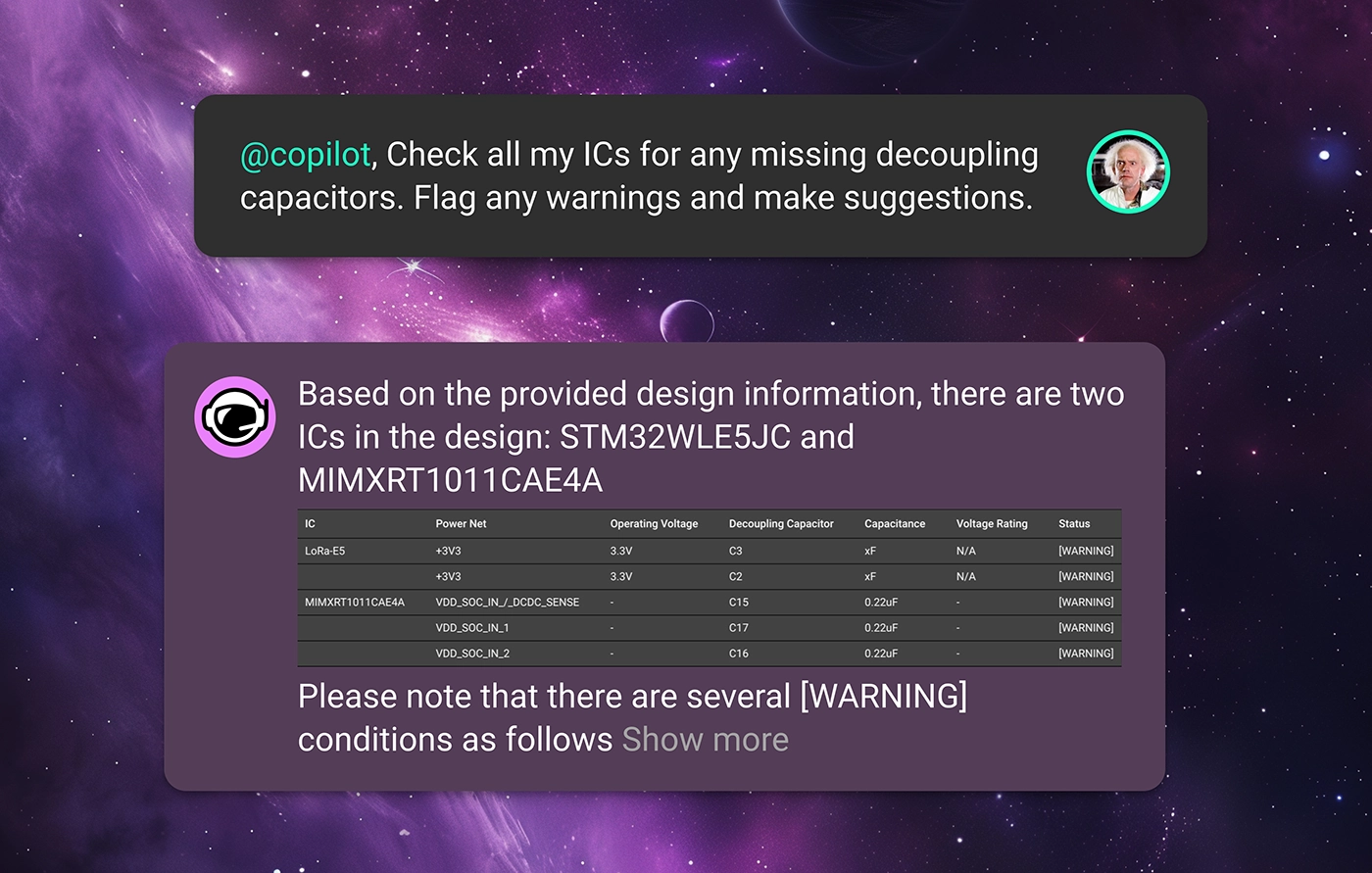
For pins that require pull-up or pull-down resistors to maintain correct logic levels, Copilot ensures these resistors are present and correctly valued. This review helps maintain functional integrity throughout digital circuits, especially in complex designs. An example prompt might be

Copilot can check that all components requiring power are correctly connected to power sources and that all grounds are properly established. This ensures no component is left unpowered or incorrectly grounded, which is crucial for circuit functionality. Try asking
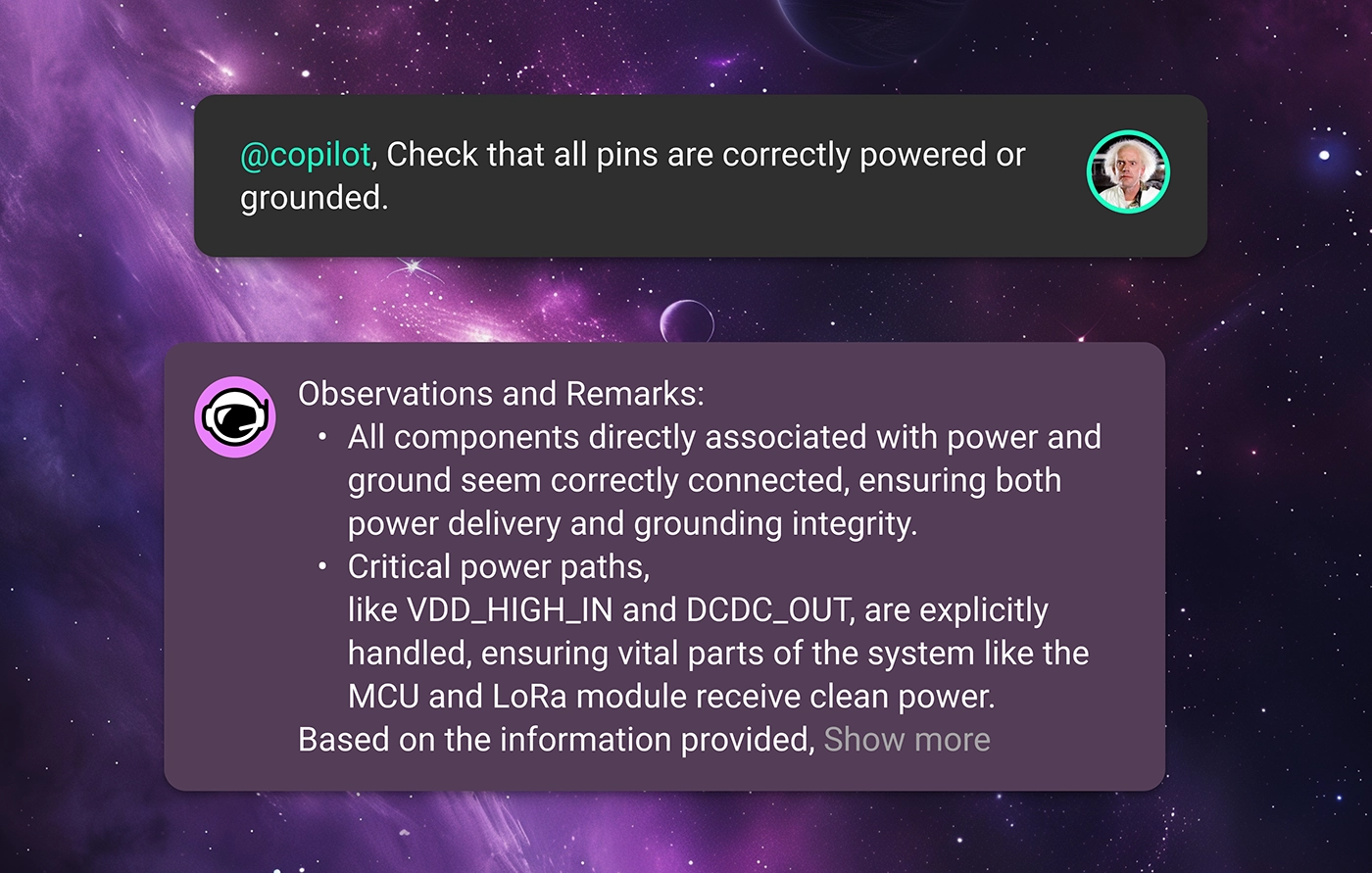
In each of these prompt examples, Copilot will read through component datasheets, check the context of your design, and provide expert-level feedback to your team. That way, errors can be caught earlier on and not propagate deeper into your design’s lifecycle.
It’s one thing for your design to work, but, for a product to work reliably, it needs to be compliant with industry standards and regulations as well as your enterprise’s internal standards. This is often one of the biggest headaches in bringing a product to market.
For example, maybe the product team requires that your design achieves certain product certifications, meaning that there are rigid compliance standards to adhere to. Checking all the parts in your BOM to ensure that they meet your project requirements takes forever. In a situation like this, Copilot can ensure that the schematic design adheres to specific industry or environmental standards or regulations by checking component specifications and circuit configurations against predefined criteria. For example, ask Copilot
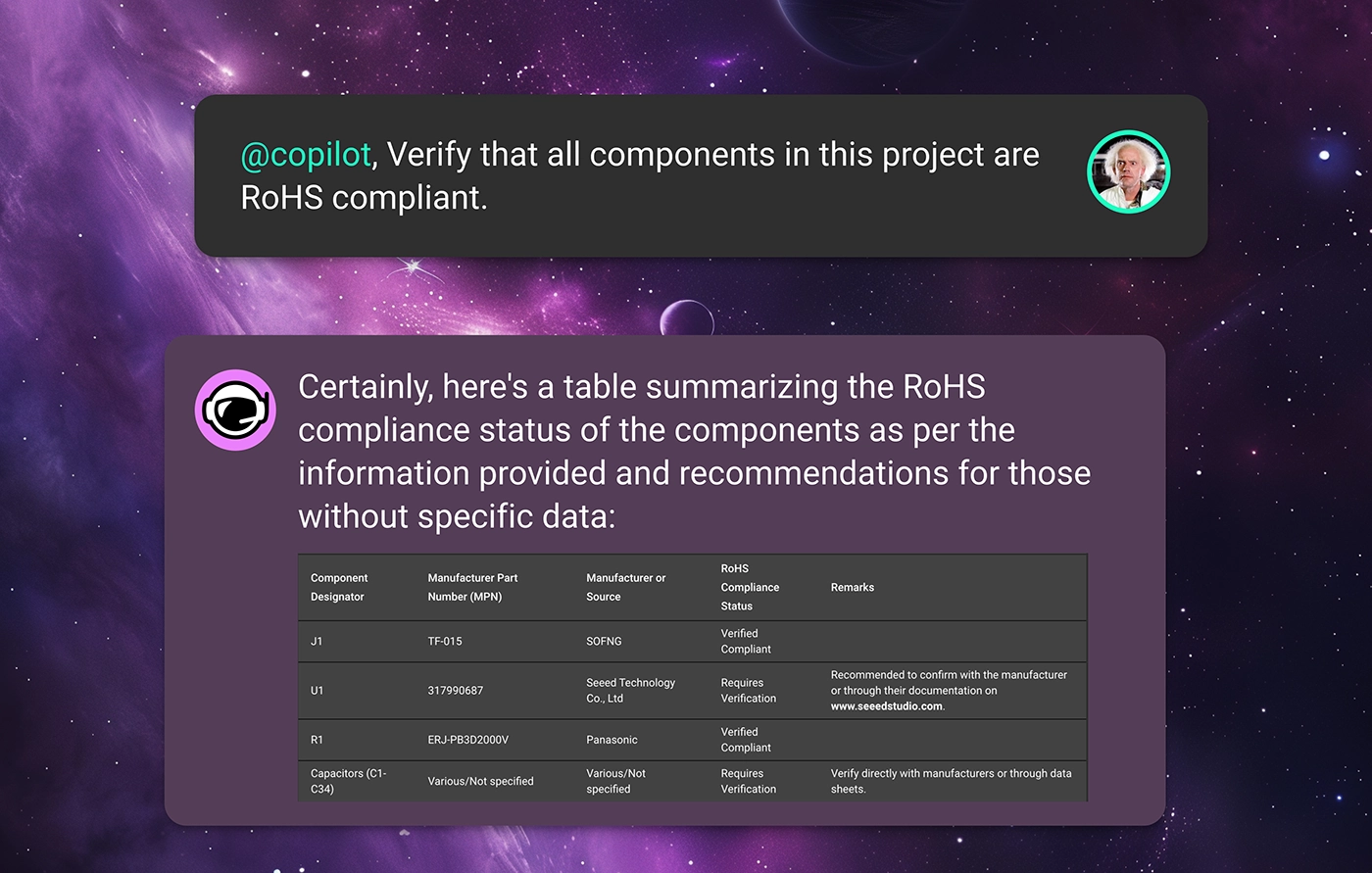
Or maybe your organization has strict design rules that should be adhered to concerning temperature ratings, power ratings, or derating characteristics. With Flux, every organization can define its specific design constraints using Copilot Templates. These templates are a place for your organization to define its project requirements so that Copilot can check your design against these rules to ensure that your design is meeting expectations.
With this knowledge, Copilot can read through datasheets to automatically verify that each component’s ratings are suitable for the intended application, reducing the risk of component failure under operational conditions. Just ask Copilot something like
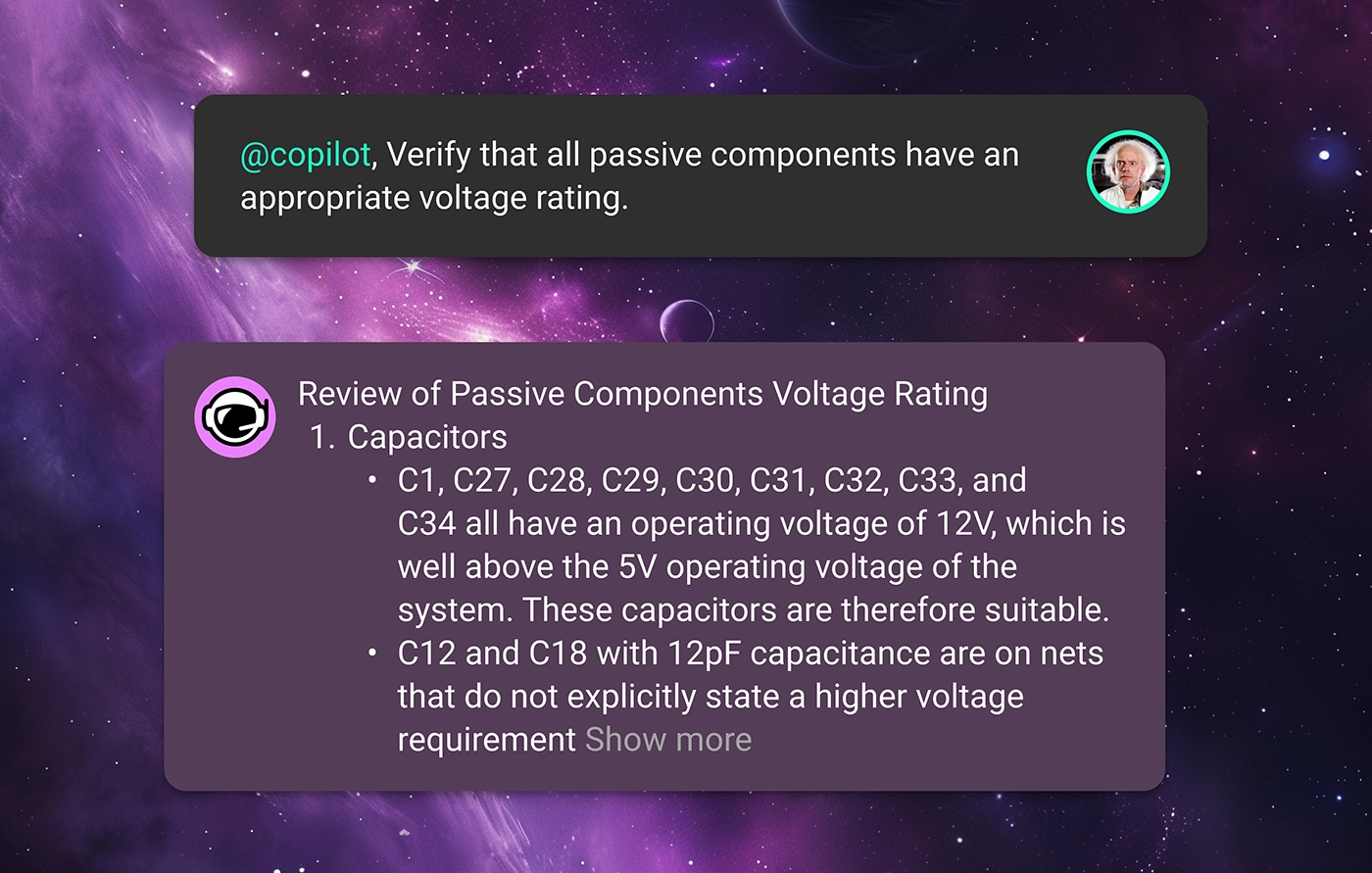
With Copilot’s insight, you can ensure that your product reaches compliance with fewer design revisions, helping your team get the product to market faster.
Launching a product in the modern marketplace undoubtedly requires a design that is robust against supply chain volatility.
How many times have you finished a circuit design only to find out that one or more of the components has 10+ week lead times? When you’re trying to get a product to market, you can’t be at the whims of the post-COVID electronics supply chain.
Want to see if the parts in your BOM are all sourceable? Flux offers built-in integrations with industry-standard suppliers like Mouser, DigiKey, and LCSC to provide real-time pricing and availability data for all of the parts in your design.
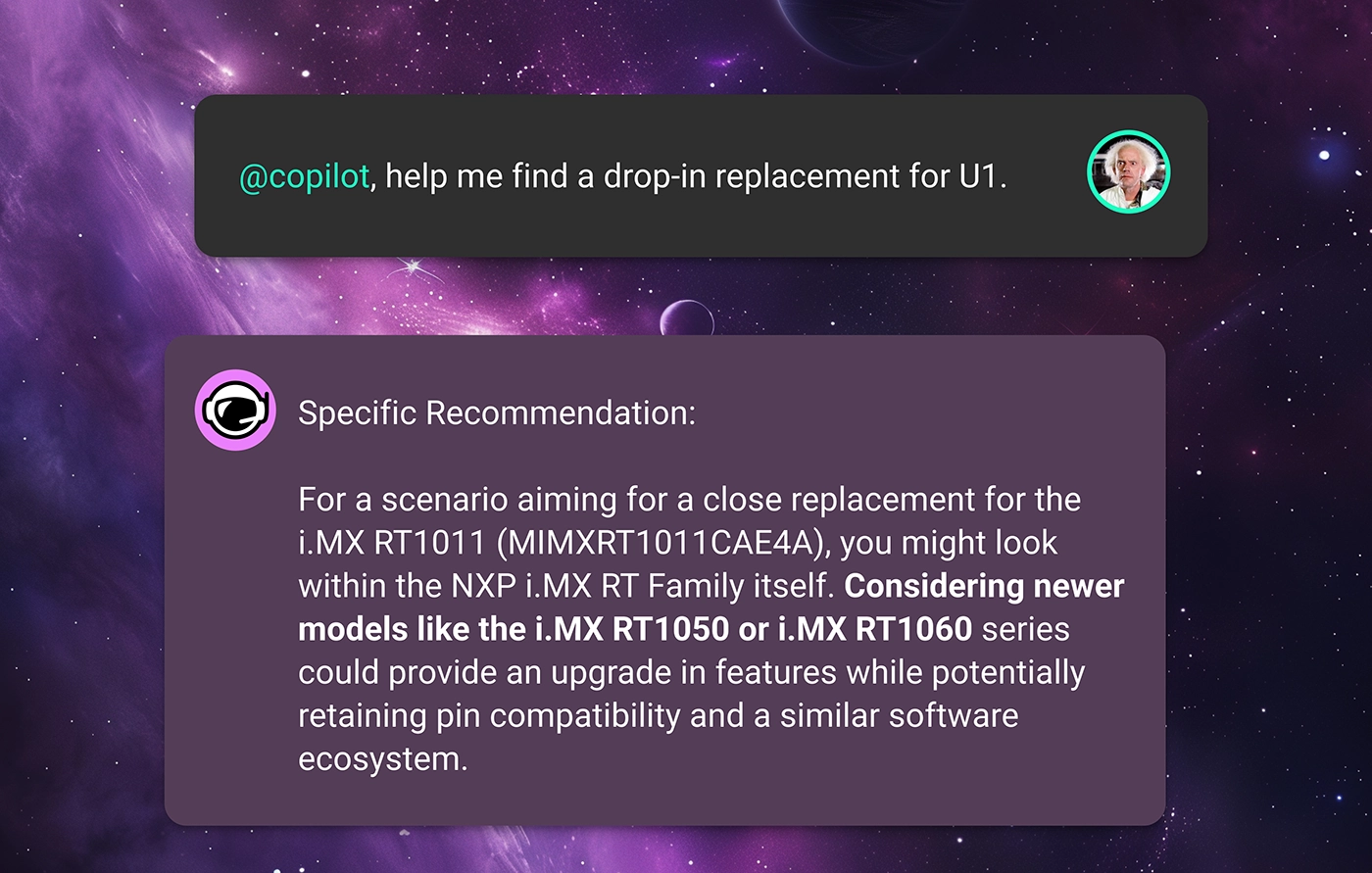
Then, if you're in need of component alternates, Copilot does the hard work for you. Thanks to our partnership with UltraLibrarian, Flux Copilot has access to thousands of the industry’s favorite parts right in the Flux Library. That means that Copilot can search through its database of components, comparing datasheets and availability data with your original part to find the most ideal drop-in alternates for your design. Ask copilot
Free your team from volatile supply-chain fluctuations and ship products on your own schedule.
This is only what’s possible with Copilot and AI today. In the future, we imagine a world where AI can do much more.
What if AI could continuously review your design in real time without being prompted? What if we could harness AI to make sure that there were no design errors ever, and first revision designs were good enough for production? We are building a future where faster and more continuous design reviews enable a completely new way of working, regardless of your platform or workflow.
At Flux, we believe that those “what-ifs” don’t have to be dreams. We are constantly working to make them a reality.
Want to learn more about how Flux’s AI can help revolutionize hardware design? Sign up for Flux today.
Testing plays a major role in minimizing errors during mass production, yet creating thorough test plans can be challenging and time-consuming.. That’s why we're excited to introduce AI-generated test plans and collaborative workflows, ensuring your hardware is manufactured error-free!
The first challenge is identifying which aspects of the prototype need testing. Just because a prototype functions correctly doesn't guarantee it's ready for mass manufacturing. Certain signals that appear stable in prototype testing might fall out of spec under the stresses of mass production. Identifying and correcting these discrepancies early is crucial. Resolving errors discovered at the mass manufacturing stage can be exceedingly costly..
Copilot understands the detailed interplay between all the components in your design and has expert-level knowledge of electronics fundamentals. It uses this expertise to identify which signals are most critical and which are likely to fail based on conventional EE concepts and the specifics of your design.

Now Copilot has helped you understand which signals to keep an eye on. But still, the question remains: how do I go about testing my signals? This is where a well-detailed test plan comes into play.
Some of the most important questions to address in a test plan include
Copilot helps your team answer all of these questions by developing comprehensive and robust test plans for your design. Simply prompt Copilot with a question like

With a comprehensive test plan, your team can ensure that any design errors get caught early in the process and well before you go to production. This means your team can spend less time correcting errors and less money on unnecessary design revisions. Ultimately, that translates to higher quality products and faster time to market.
Once you’ve executed the test plan, you’ll need to interpret your results and solve any design issues that have been revealed.
You can directly provide Copilot with the results from your test. For example, you can attach a screenshot of your oscilloscope’s capture to give it more context. Your prompt might then look something like this
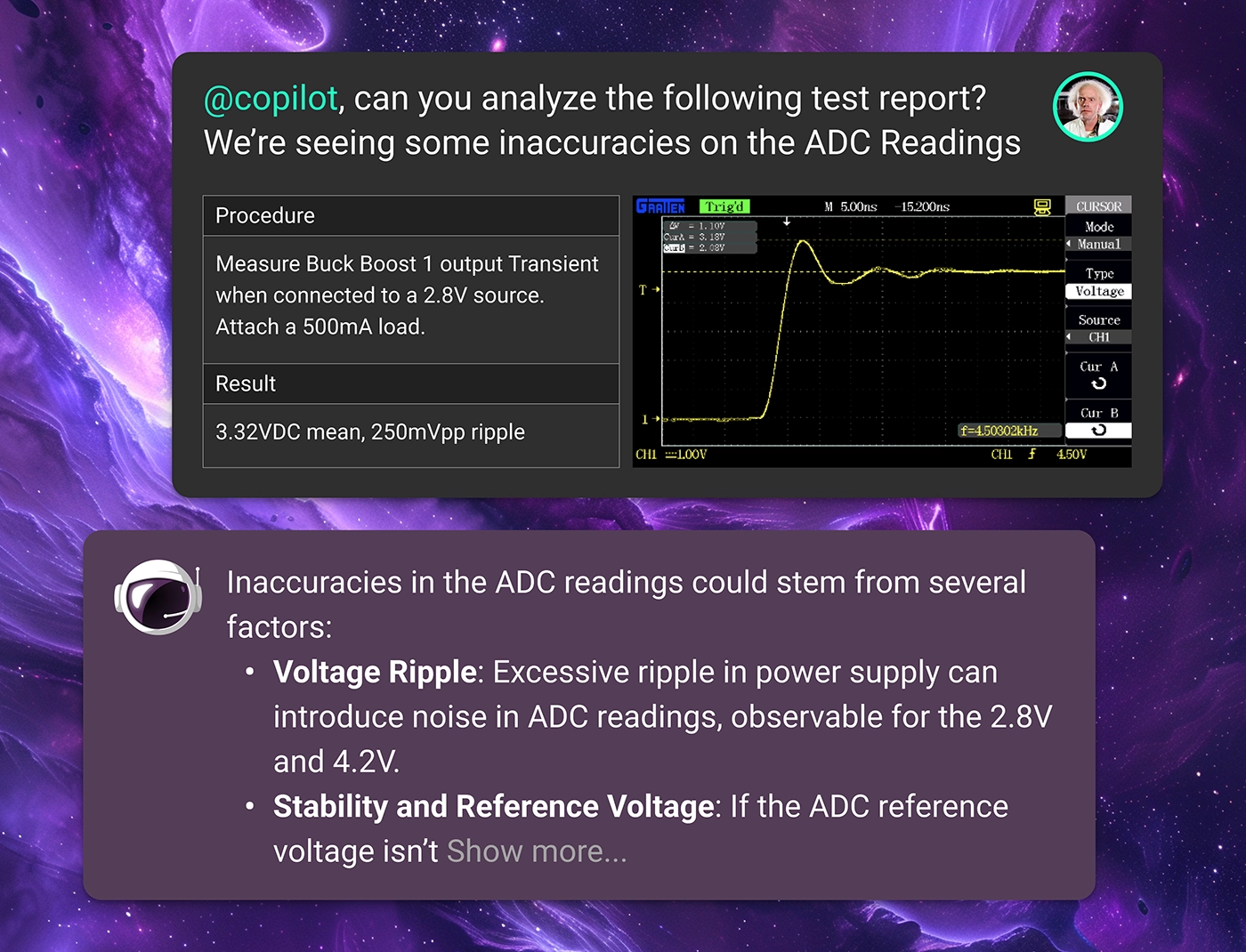
Flux not only streamlines the testing and debugging process but also enhances the way test engineers and designers collaborate on projects. By integrating collaboration within the design tool, Flux ensures that all team members have real-time access to test data, design changes, and analytical insights. This seamless integration allows for immediate feedback loops and faster decision-making, which is crucial when addressing complex design challenges
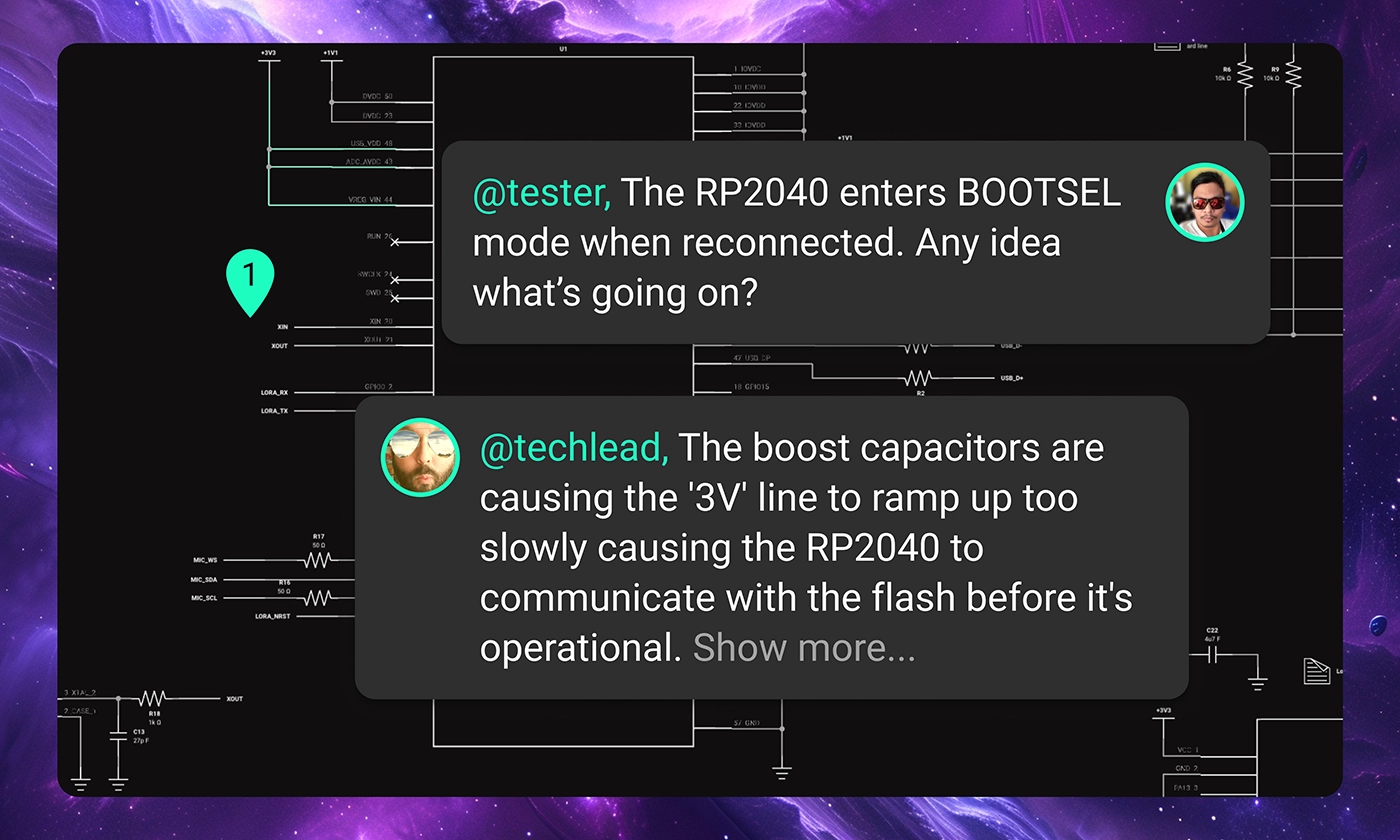
With Flux, your team can swiftly move from identifying issues to implementing solutions, accelerating the development cycle and enhancing overall productivity.
Don’t let a clunky testing and debug workflow lead to product failures. Flux can help you streamline the process so that your team can bring high-quality products to market in less time and at a lower cost without sacrificing quality.
Want to learn more about how Flux can help revolutionize hardware design? Sign up for Flux today.

With Flux, enterprises can take their architectural ideas and use AI to transform those ideas into actionable items. With Copilot, your enterprise can generate schematics, perform AI design reviews, and even identify PCB technology, budgets, and timelines well in advance of any manufacturing.
At this point, your team has a block diagram. Still, your project is mostly abstract. The Component and Technology Selection phase is where things start to get tangible. With a detailed block diagram as the phases’ input, it's time to start selecting components and putting a real system together.
With Flux, your team can use AI to expedite everything in this phase, from component selection and design review to cost estimation and sourcing.
Let’s discuss how AI can take your team’s architectural ideas and help them select components and identify core technologies.
The first step in this phase is to start selecting components, and that’s one place where Copilot really shines. Copilot is guided by your company’s guidelines, including regulatory requirements, pricing, power consumption, operating conditions, and more. With these parameters defined in a Template, Copilot finds the best components that fit your specific project requirements.
Start by providing Copilot with your architecture as a block diagram and asking:
@copilot, here’s my system block diagram. What major components will be necessary to make it work?

Right off the bat, Copilot can provide clarity, insight, and direction to your project by identifying the major components and subsystems necessary for your project. Maybe your system needs an MCU and numerous sensors. Or maybe a single, highly integrated SoC can meet your needs. Copilot will provide options and specific component possibilities to help you make these decisions.
Copilot will also make sure that you have many options. To get a breadth of options and achieve greater design flexibility, just ask Copilot:
@copilot, please provide me multiple component options for each different block in my diagram

By analyzing vast databases of technical specifications and performance metrics, Copilot can help your team choose the most suitable components based on your unique needs for performance, cost, and supplier reliability.
If supply or cost becomes an issue, Copilot can help your team compare parts and evaluate potential alternatives. Just ask Copilot:
@copilot, could you please provide me with drop-in replacement alternates for U1?

Copilot can evaluate multiple parts and alternatives for the same component, comparing manufacturer availability so that you can guarantee your design will withstand the challenges of a volatile supply chain.
Copilot also aids the business side of things. With access to Flux’s native cost estimation tools that help project your BOM’s cost, Copilot can provide your team with a comprehensive understanding of the project’s financial aspects from the outset. With Flux’s real-time integration with manufacturer databases, your team can access real-time pricing and availability data to ensure that your components are under budget and easily sourced.
With Copilot’s help, at the end of the component selection phase, you should have yourself a high-level schematic diagram.
Once you have a schematic, it’s time to double-check your work. Flux Copilot can use your requirements to perform an initial review of the first schematic draft, identifying potential design inefficiencies, compatibility issues, and areas for optimization.
One aspect of this is component validation, where Copilot can help ensure that your components are interoperable, based on requirements like voltage range, communication interfaces, and clock speeds. For example, ask Copilot:

Copilot will then read through your parts datasheets, review their schematic interconnections, and provide you feedback on their interoperability.
Architectural validation is where Copilot can review the block diagram generated in the previous step and validate that the core components selected match the target use case. For example, you can ask Copilot:
@copilot, here's the block diagram I've created and here is my schematic. Do things match up?
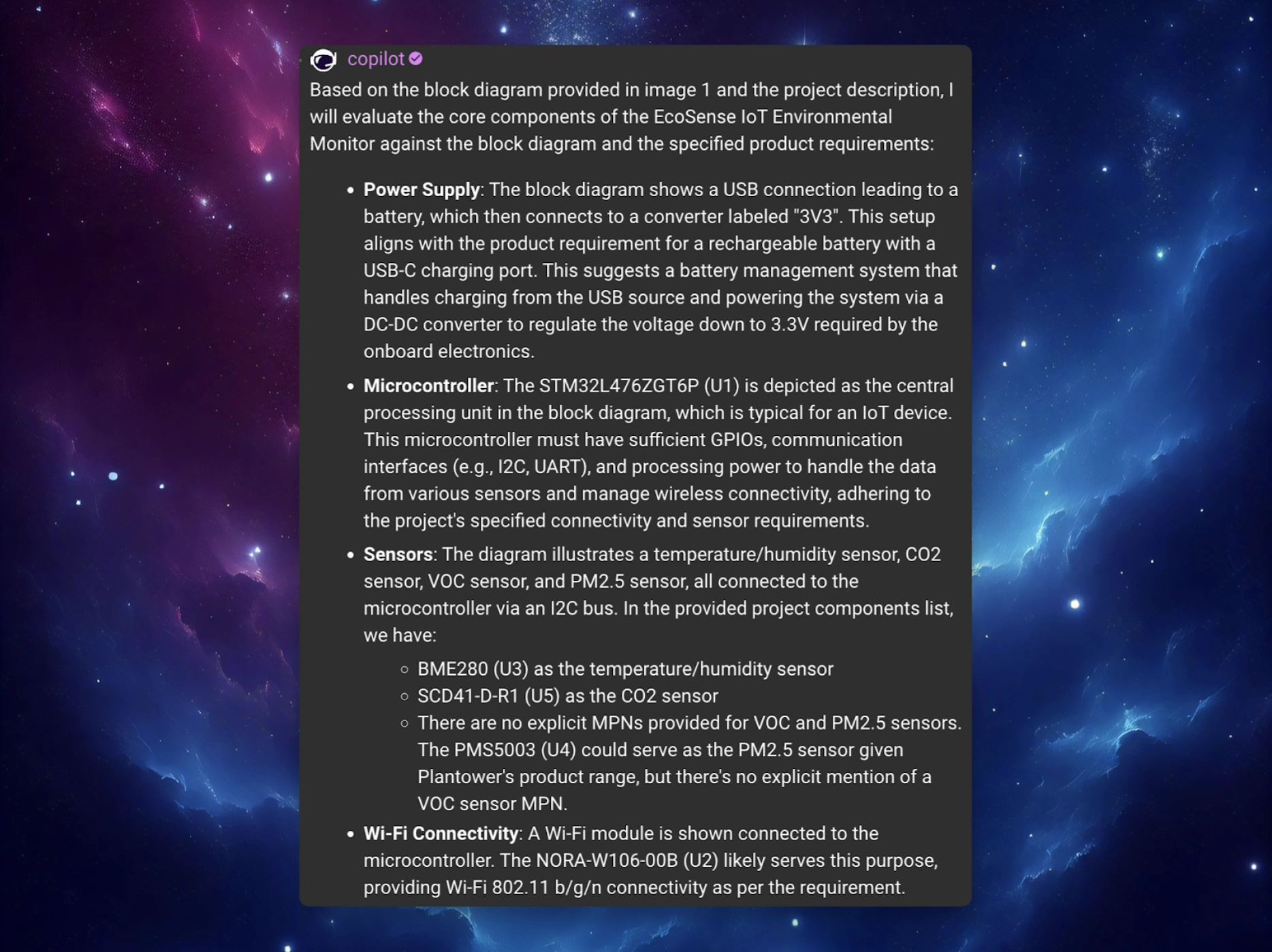
Or, Copilot can help evaluate candidate parts to match the project’s requirements and standards, including your organization-specific standards. For example, if your project is operating under a tight power requirement, you could ask Copilot:
@copilot, does my schematic meet my power requirements?
Copilot will read datasheets and interpret your schematic to estimate the system’s power consumption. It can then offer suggestions to help lower the power consumption, if necessary.
Once the schematic has been reviewed and ironed out, your engineers and product team must work together to define the project’s path forward. From the engineering side, you’ll want to identify the PCB technology requirements to make such a system work.
While your team is still early on in the design process, this kind of foresight can help you create accurate and realistic timelines and budgets for your project. At this point, Copilot knows all of your project requirements and has context for all of your core components. With this knowledge, Copilot can help your team get a feel for the project’s necessary investment concerning development time, costs, and revisions. The engineering and product teams can be aligned on the project outlook and understand the steps necessary to bring your product to market.
For example, based on the design requirements and constraints, Flux Copilot can recommend the most suitable PCB technologies for your project. By taking into consideration factors like layer count, material, and manufacturing capabilities, Copilot can make sure that your team is working towards a manufacturable design from the very beginning. Ask Copilot a question like:
@copilot, given this schematic, roughly what’s the ideal stack up for my PCB design?

With Flux, enterprises can take their architectural ideas and use AI to transform those ideas into actionable items. With Copilot, your enterprise can generate schematics, perform AI design reviews, and even identify PCB technology, budgets, and timelines well in advance of any manufacturing.
Want to learn more about how Flux’s AI can help revolutionize hardware design? Sign up for Flux today.


