
Flux's AI agent is now up to 10x faster and self-corrects in real time, delivering cleaner schematics with less waiting and fewer wasted credits.
With Copilot, the brainstorming process is easy. Given your requirements, just prompt Copilot and it will dynamically generate and evaluate architectural variations, balancing technical specifications and regulatory requirements in real time.
At Flux, we envision a different approach. Flux transforms architectural design by leveraging AI to rapidly generate and evaluate a wider range of options against your specific product requirements, ensuring a more effective selection process that leads to optimal outcomes. Here’s how:
To begin, you can simply have a conversation with Copilot about what you intend to build using as much information as you know. Copilot can use your requirements and constraints to explore many different architectural ideas and variations quickly.
You can also start with a Copilot Template with your design requirements objectives, constraints and regulatory aims, Copilot will use these guardrails to help find the best architectural solution that fits within your enterprise’s unique requirements. The more Copilot knows about what you want to build, the smarter architectural design recommendations it can make.
Simply add properties to your project like operating voltage and temperature, human interface, connectivity, and power requirements to give Copilot more context. Feel free to check out the full list of project requirements we used in this Audio Amplifier example.
For example, you can ask Copilot something like
@copilot, I'd like to build a smart curtain that opens or closes based on the amount of sunshine I want to enter my room. How would you approach designing this? Please ask me questions to help with the development?
If you already have ideas and need help brainstorming, communicating with Copilot is intuitive and flexible. Already started working on a whiteboard sketch? Prefer working with figures and block diagrams? Just send Copilot images of your block diagrams or sketches and watch it convert them into actionable specifications and feedback.
With Copilot, the brainstorming process is easy.
Given your requirements, just prompt Copilot and it will dynamically generate and evaluate architectural variations, balancing technical specifications and regulatory requirements in real time. For example, you could ask Copilot
@copilot, based on my requirements, help me figure out the best power architecture for this project. What should the power tree look like?
or
@copilot, brainstorm a few architecture options for this project. Compare all options in terms of total BoM cost and time to market. Particularly consider: Should I use modules or standalone MCUs?
Watch as Copilot transforms your requirements into detailed, actionable architectures and block diagrams. This direct translation from concept to plan streamlines the initial step of architectural design, ensuring your ideas are grounded in reality from the outset. And the automation of the process allows Copilot to generate multiple architectural solutions for you to choose from. This breadth of exploration ensures that every possible avenue is considered.
You can create a block diagram by asking Copilot something like
@copilot, please create a mermaid-formatted block diagram for this architecture.
Copilot can then help you in iterating on your design. Think of working with Copilot as a natural, free-flowing conversation. Working with Copilot in a back-and-forth feedback loop is the best way to ensure the optimal final result.
For real examples of using Copilot of brainstorm and generate architecture options, check out these project demos:
Copilot’s outputs improve the hardware design process significantly. But still, you and your team will want to evaluate your options and decided on the best path forward.
Flux's environment is designed for collaboration, enabling multiple stakeholders to engage in the architectural drafting process simultaneously. With built in-project commenting, everyone in your organization can share their thoughts and see the feedback of others. That way, the whole team is on the same page and all ideas are taken into consideration. And, with automatic version control, your team is free to experiment and iterate on different approaches, knowing that no idea is ever lost.
If you needed more support, you can bring Copilot back into the loop as a design review partner. Ask Copilot to review your chosen architecture, make suggestions, and offer improvements.
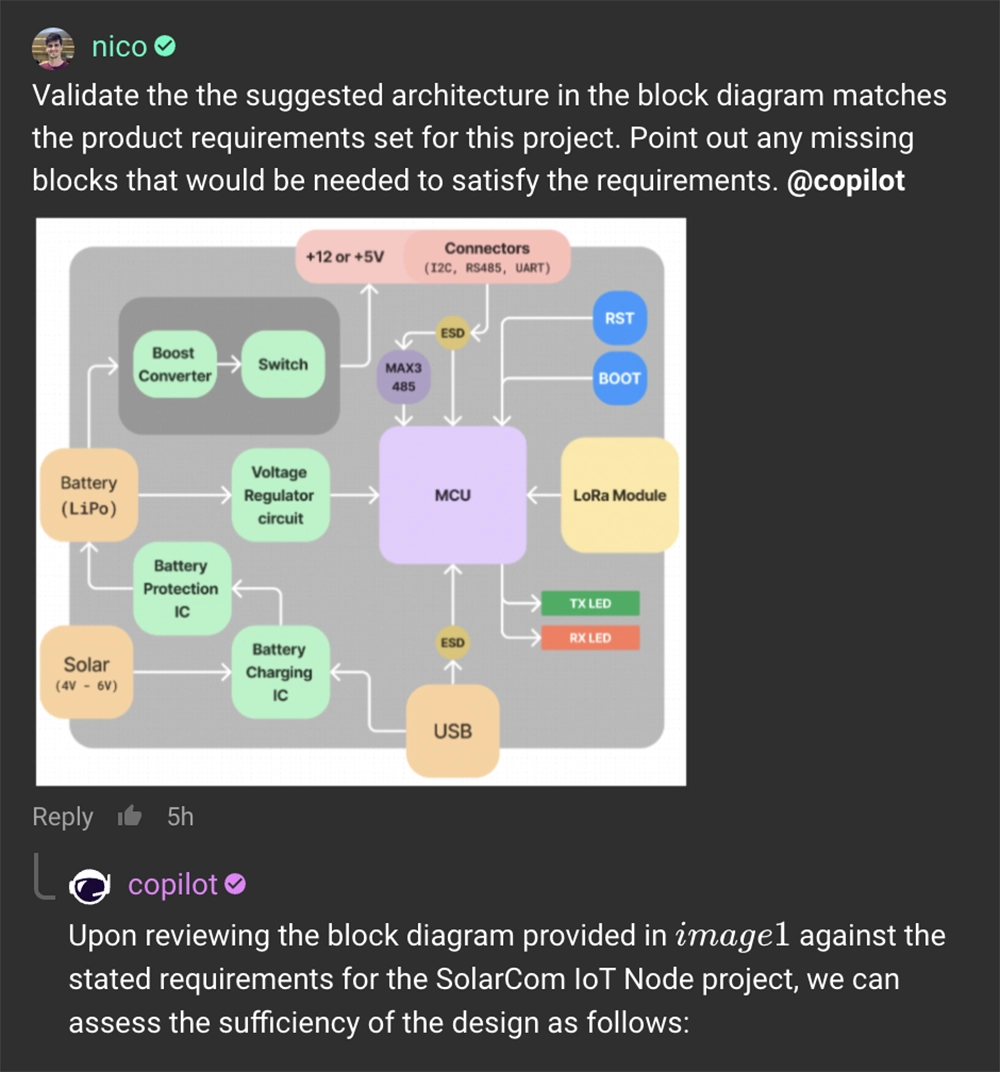
What’s more - by embedding the architecture directly into the design tool, Flux ensures that these foundational decisions guide and inform all subsequent stages, from component selection to detailed design, keeping critical information accessible and actionable throughout the project lifecycle.
Using Flux, enterprises can integrate AI into their workflows, making for better decision-making, reduced risk of error, and faster times to ship products. With the ability to adhere to your requirements and specifications, generate multiple architectural options, and bring together multiple stakeholders, Flux is reimagining the architecture design process.
Want to learn more about how Flux can help revolutionize hardware design? Sign up today.
Hardware just got a little less hard. See how Flux reduces busy work, keeps your team in sync, and gives you AI superpowers.
Today, we're thrilled to unveil a video that tells the story of that vision and the exciting future we're building together. We interviewed real Flux users — real professional Electrical Engineers — to showcase the power of Flux and Copilot. The reactions we got were priceless. You can practically see the lightbulbs clicking on in their heads.
We’d like to thank our community for sharing their amazing stories and joining us on this journey to take the hard out of hardware!
Onward and Upward 🚀,
Matthias & Lance
We're excited to reveal a major upgrade - Flux Copilot is transitioning from being a helpful guide to a proactive partner. It no longer just advises but, with your approval, can now wires components together! This is a small step towards fully generative AI, reducing the time and complexity often associated with component connections.
Last month we launched Flux Copilot, the industry’s first AI-powered hardware design assistant integrated into a PCB design tool. The innovative ways in which you’ve employed it to brainstorm, debug, conduct part research, and answer project-specific queries have truly amazed us. To celebrate this, we've compiled a page featuring all our favorite Flux Copilot prompts.
Today, we're excited to reveal a major upgrade - Flux Copilot is transitioning from being a helpful guide to a proactive partner. It no longer just advises but, with your approval, can now wires components together! This is a small step towards fully generative AI, reducing the time and complexity often associated with component connections.
Imagine working on a complex electronic circuit project, only to realize that you're not entirely sure how to connect the components. With the upgraded Flux Copilot, you can now simply ask,
@copilot, how would I connect these parts to make the LED flash at 1kHz?
Instead of just providing advice, Flux Copilot gives you the option to wire it up for you, saving you significant time and reducing the tedious parts of the hardware design process.
Dealing with a complex circuit and unsure about connecting components such as the RP2040 and SPI TFT LCD? No need to spend hours poring over datasheets to figure out which pins are capable of what. Simply ask,
@copilot, how should I connect U1 and U2?
where U1 and U2 are reference designators (REFDES) of RP2040 and TFT LCD in the schematic editor, respectively.
Just watch as Copilot smartly wires up your components in the schematic editor. Discover how to construct an RPi-pico-like board in just 20 minutes using Flux Copilot in this tutorial!
High-speed design is often a daunting domain, requiring specialized knowledge. There are a whole host of these requirements that make impedance control difficult to implement. Flux Copilot makes it as straightforward as any other design. Ask,
@copilot, how would I connect these two HDMI connectors as a pass through?
and allow Flux Copilot to establish the advised connections. Then, route your high-speed traces as usual. Flux takes care of all impedance control and calculations, allowing you to concentrate on the broader design. Learn more about high speed design with Flux.
To make the most of Flux Copilot, remember these key tips:
This is just one small step towards our vision of taking the hard out of hardware, and we couldn’t do it without your participation and feedback. We’re particularly excited about empowering individuals to iterate faster with Flux Copilot, using it like a senior electrical engineer that’s always there to brainstorm solutions, debug circuits, and discuss challenges with you.
We can't wait for you to experience the new and improved Flux Copilot and discover the difference it can make in your projects. Please let us know if you have any feedback or questions on Slack.
We're excited to see the incredible designs you create!
Best,
Matthias Wagner
Effortlessly enhance your electronic product development with Flux Copilot, the innovative design assistant by Flux. With features like schematic feedback, component selection, and design analysis, Flux Copilot leverages the power of AI to accelerate innovation, save costs, and avoid mistakes in your PCB design process.
In this blog post, we will explore the revolutionary features and insights offered by Flux Copilot, showcasing how it can transform hardware design and empower engineers to create innovative and reliable electronic products.
Since Flux Copilot lives in your comments, it’s a truly collaborative tool. By simply asking Flux Copilot for information through a text interface, designers gain access to an endless wealth of knowledge to assist in the design process. The result is that the barrier to entry for hardware designs has been significantly reduced, allowing engineers to produce higher quality hardware designs in shorter amounts of time and at less cost than ever before.
Like a personal design expert at your disposal, Flux Copilot is meant as a tool to augment the hardware design experience of the Electrical Engineer. The LLM does not guarantee 100% accuracy in its responses at the time of launch, so Flux Copilot is to be viewed as a guide for the designer and not as a substitute for the designer’s judgment or expertise.
At the heart of Flux Copilot is a Flux-trained large language model (LLM) that resides within your project, providing a wide array of functionalities to assist engineers in their design process. Copilot can be queried through comments or chat, offering a convenient and intuitive way to interact with the AI-powered assistant. Let's take a closer look at some of the capabilities of Flux Copilot:


The integration of Flux Copilot into the hardware design process offers several benefits that can revolutionize the way engineers approach their designs. Let's take a look at some of the key benefits of using Flux Copilot:
Beyond its purpose for professional Electrical Engineers, Flux Copilot also opens up educational opportunities for different groups of users such as students and Operations Engineers. For example, an Operations Engineer can improve their productivity by asking Flux Copilot “Please find me a drop-in replacement for component U1”. A student can use Flux Copilot to learn circuit design principles by asking “Please explain the function of U1 in this circuit.”
Like with any other tool, mastering Copilot takes some practice. To get the most relevant and valuable suggestions, make sure you follow these best practices:
"What components do I need to connect a 30w speaker to this U1?"
"Are there any alternatives to this part that have better availability?"
"I have U1 with these pins and these other parts - how do I connect them?"
"Have I connected things correctly?"
"Do I really need this resistor? I'm trying to save money. Are there cheaper versions of the components I'm using?"
"How much power does this IC can deliver?"
Flux Copilot, the industry's first AI-powered hardware design assistant integrated into a PCB design tool, offers a wide array of capabilities that can revolutionize the way engineers approach hardware design. With its ability to understand schematic designs, component lists, connections, and part information from datasheets, Copilot can provide valuable insights, suggestions, and feedback to streamline the design process, optimize designs, and enhance overall efficiency. From generating new ideas and exploring design options to validating calculations, offering tailored suggestions, and simplifying procurement, Copilot can empower engineers to create innovative and reliable electronic products. With its integration with Flux's community-created parts and components library and its ability to facilitate collaboration, Copilot is a game-changer in the field of hardware design. Embracing the power of AI in hardware design through Flux Copilot can unlock new possibilities, accelerate innovation, and drive the advancement of the electronics industry.
Ready to experience the power of Flux Copilot? Head to the Flux Copilot documentation page to learn more about its features, functionalities, and how to integrate it into your workflow.
The process of creating symbols is often too rigid and tedious to create schematics that are beautiful. That’s why, today, we’re introducing parametrically programmable schematic symbols in Flux.
That’s why, today, we’re introducing parametrically programmable schematic symbols in Flux.
In modern EDA tools, creating schematics and symbols entails a manual process of drawing rectangles, squares, and lines with a mouse and cursor. Too often, we fight with symbols because they’re so hard to modify. It can feel impossible to create any sort of sane signal convention. Interconnections and signal flow ultimately devolve into lines leaving your symbol’s pins in seemingly random order and direction. How is anyone supposed to make sense of these schematics?
Flux's parametric symbols change how we view schematic symbols by offering you customization and flexibility. With parametric symbols, your team can better organize your schematic symbols by grouping pins based on functionality and logical connection, without needing to physically draw the symbol. Want all GPIO to be grouped together? Maybe you want all power pins to be on the left side of the symbol? Or, do you want all ADC channel pins to be next to each other?
Parametric symbols enable your team to make designs organized and readable. The result is a symbol that isn’t just a square with some lines, it’s a neatly organized, clearly partitioned set of functions that can be easily interpreted by anyone on the team and beyond. Don’t fight with rigid symbols. Instead, organize your symbol as you want, make the signal flow clear and intuitive, and end up with a schematic design that is simple to understand.
Parametric symbols also introduce unprecedented levels of flexibility and customization. Unlike conventional symbols that need to be completely redrawn by hand if changes are desired, parametric symbols are configurable on the fly. No more hassle and wasted time using a drawing tool to rearrange pins.
At Flux, we believe your design should be declarative, not imperative. You should tell your symbols how they could behave - not the other way around. Parametric symbols are our first step in realizing this reality.
Creating parametric symbols in Flux is as simple as filling out property fields in the Inspector Panel. 4 properties determine how the symbol arranges itself:
Once the symbol is created, it can be changed easily by redefining properties to your liking. That means that symbols are dynamic and configurable with little to no effort and wasted time.
To learn more about how to work with parametric symbols in Flux, check out the documentation page.
Parametric symbols are our first step towards a truly declarative workflow with Flux. Soon, you will find declarative workflows integrated into every feature, including the PCB Editor.
Want to learn more about how to start using parametric symbols in Flux? Contact sales today.
We’re excited to announce our partnership with Ultra Librarian to bring millions of high quality and trustworthy components directly to the Flux ecosystem. This partnership marks a big step towards bringing together all semiconductor manufacturers, distributors, engineers, and the whole hardware industry.
Ultra Librarian is the biggest name in the electronic components sector, boasting a repository of millions of parts from diverse manufacturers. Their commitment to maintaining an up-to-date and accessible library for PCB designers aligns perfectly with our goal to offer an efficient, user-friendly design experience. With Ultra Librarian providing access to the world’s largest online electronic component CAD library, Flux users are assured virtually unlimited access to any component they might need, directly published and accessible in real-time within the Flux platform.
Our decision to partner with Ultra Librarian was heavily influenced by the feedback from our community. You want more, high-quality, and trustworthy components available in the Flux library. So, we knew we had to do something big.
Gopu Achath, VP of Technology for Ultra Librarian, emphasizes the importance of fostering this partnership to help drive the industry forward,
“The collaboration between Ultra Librarian and Flux plays a crucial role in the evolution of electronic design. We're enthusiastic about contributing to the dynamic evolution of the CAD design space as Flux endeavors to streamline and digitize the experience. Ultra Librarian continues to lead the charge ensuring CAD models remain easily accessible across various platforms.”
Together with Ultra Librarian, we’re going to be gradually bringing all of Ultra Librarian’s manufacturers into the Flux ecosystem.
We’re starting to roll out the Ultra Librarian partnership with Monolithic Power Systems (MPS), a leader in all things related to power and semiconductors. Users will now have access to over 3,500 of the company’s parts for immediate use in their designs, as well as MPS-created reference designs for inspiration. To use MPS’s parts, simply search for Monolithic Power Systems in the component library and drop them onto your canvas.
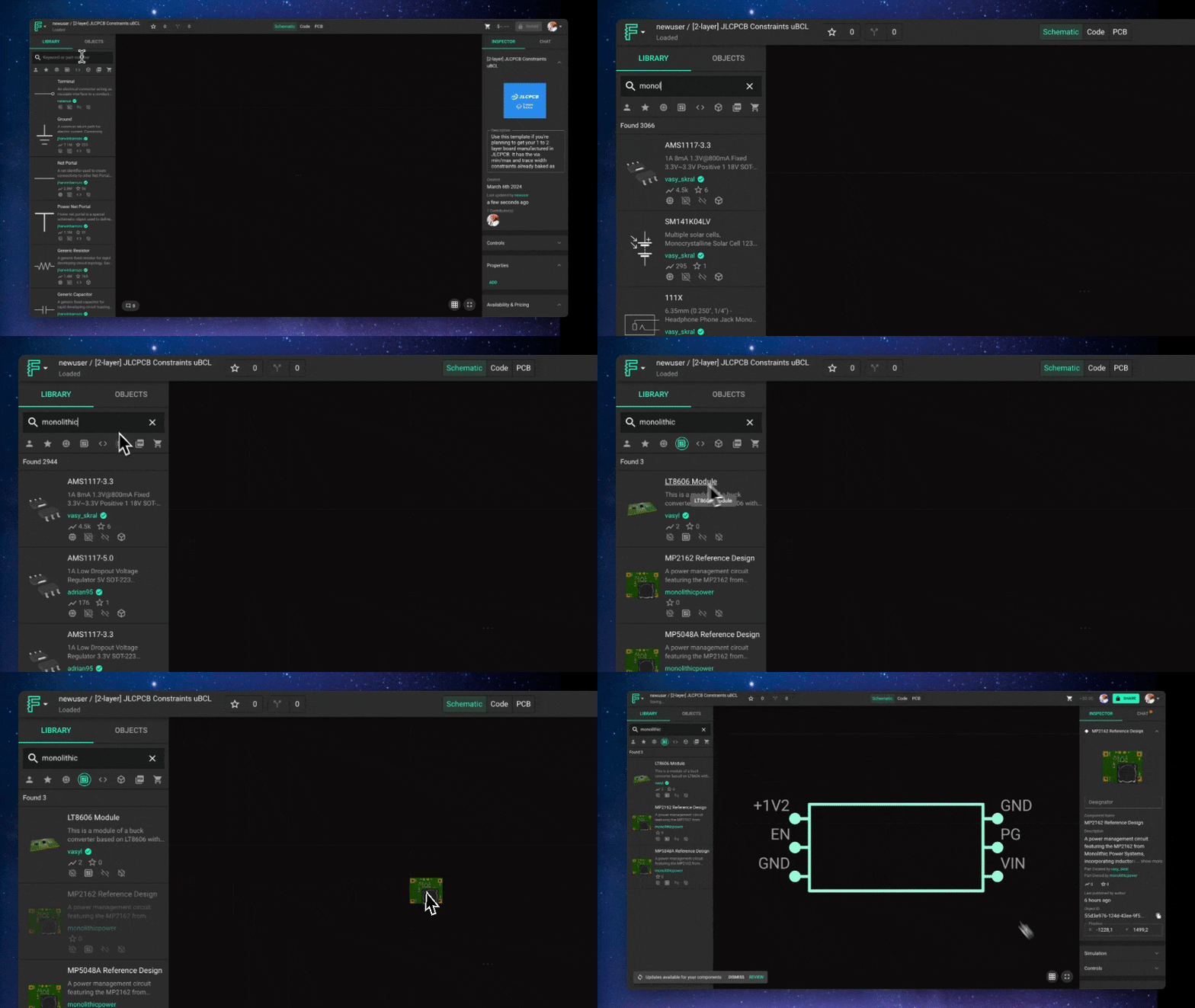
You can also follow MPS’ Organization page to get updates for new components, references designs, and other useful materials. Here are some example MPS reference designs that you can fork in Flux today!
Following MPS, we’ll be bringing on many more of Ultra Librarian’s brands into our tool so users can access the same benefits from their favorite manufacturers.
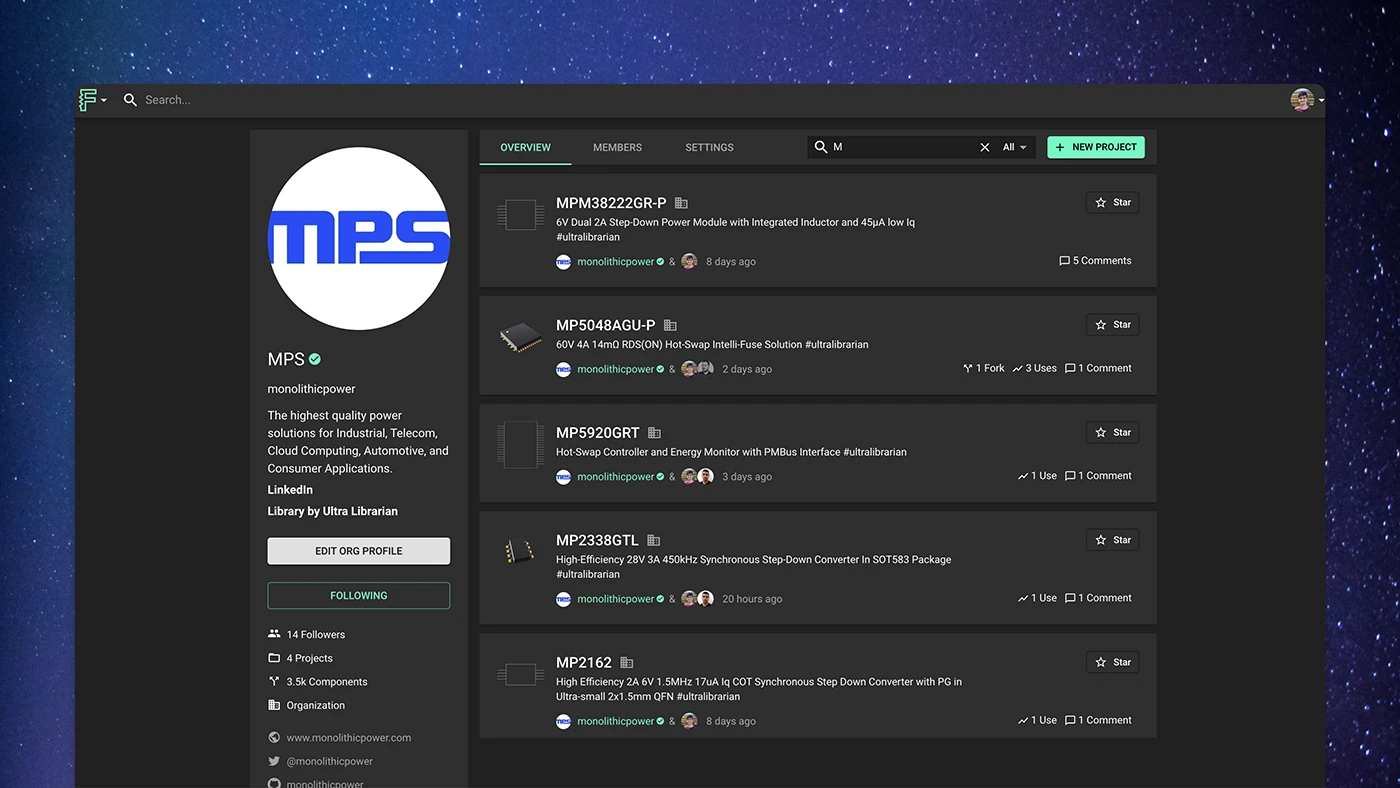
This partnership brings the Flux community unprecedented advantages allowing engineers to interact directly with their favorite manufacturers from their Organization page, including parts, reference designs, and modules.
This partnership marks a big step towards bringing together all semiconductor manufacturers, distributors, engineers, and the whole hardware industry. We envision a future where designers and manufacturers can collaborate, where designers can find reliable, high-quality electronic components, and teams can create innovative hardware. This collaboration is a significant step towards that future.
We want to hear from you! What’s the next manufacturer you want to see brought into the Flux Library? Let us know by filling out this survey!
We couldn’t be more excited for what’s ahead!